
Get help for a tampered device
Clover detects tampering in different ways depending on the Clover device you use.
About PIN entry devices
Payment Card Industry (PCI) compliance dictates that PIN-entry devices auto-detect if tampering of a device occurs, and if detected, lock the ability to take PIN-entry transactions. Clover devices come with sensors that are used to detect misuse or harm to your device. In rare cases, tampering may be detected if a device is dropped or shaken.
If our sensors detect tampering, you'll receive an email from Clover that a tamper has been detected. If you have questions or suspect that your device has been tampered with, contact Clover support.
Recognize a tampered Station, Mini, or Flex
If your Station, Mini, or Flex device detects a tamper, three potential screens might appear.
-
In the Setup Wizard, you might be automatically directed to the Get Help screen with the error Device tampered, return to manufacturer.
-
In the Setup Wizard, you might see a Tamper Detected screen.
-
If the device detects a tamper after activation, the following error is displayed in the Sale, Refund, Phone Sale, Authorizations, and other apps.
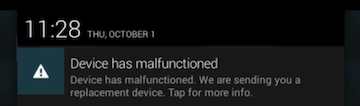
The only way to remove the tampered message is to request a new device from Clover support.
Recognize a tampered Clover card reader
Clover card readers (where available) display different tampering characteristics based on the model.
Important: When a tamper is detected on any Clover card reader, you can no longer use the reader to accept payments and must request a replacement to restore card reader functionality.
-
Clover Go G3. A message appears in the Clover Go app indicating suspected tampering, and an email is automatically sent to the email address associated with your Clover account.
-
Clover Go G2. Lights on the card reader flash in a random pattern.
-
Clover audio jack reader. A light on the side of the reader flashes.
You can continue to take payments in the Clover Go app without a card reader by scanning or entering card details manually (where available).
Replace a tampered device
It is essential to replace a tampered device as soon as possible to restore full payment functionality.
-
Clover devices. If tampering is detected, encryption and anti-tamper mechanisms continue working to safeguard cardholder data when processing payments. However, PIN-entry payments are disabled.
You can continue accepting transactions that don't require a PIN use your device to run other aspects of your business such as taking orders, report generation, or syncing with your other Clover devices. -
Clover Go card readers. If tampering is detected, you can no longer accept payments and must contact customer support to request a replacement.
Note: You must be an owner or admin to request a replacement device.
For Station, Mini, and Flex devices
-
Open the Setup app.
-
Tap Payments.
-
Tap PIN Entry.
-
Tap Prompt for PIN.
-
Tap Save.
-
Tap I need to accept PIN payments, please send me a replacement Clover device
that accepts PIN payments.
-
Tap OK.
When your device ships, you’ll receive a notification email from Clover Support (noreply@clover.com) containing your activation code as well as the tracking information for your shipment. If the device is still in the warranty period, then the replacement device is free of charge. Shipping and handling fees may apply.
Activate your new device and return the tampered device in the same box that you received your replacement device. You'll find a return shipping label included in the box.
Inspect your device for tampering
Your Clover Device should be inspected for signs of tamper. Here is a partial list of things to look for:
-
The exterior of the device shows evidence of cutting, disassembly, broken seals, broken ports.
-
There are unusual wires or overlays connected inside the chip card slot, on or near the PIN-entry area.
-
Wires are loose or connector broken.
-
The number of connections to the device are different.
-
The cables are a different color.
-
There are apparent changes to the resistance when inserting or removing a card from the chip card slot.
-
Your device is in a different location.
-
Your device has scratches especially around the seams of the terminal window display.
-
Clover labels are missing or show signs of peeling.
In addition, check the PCI website for best practices.
Comments
0 comments
Please sign in to leave a comment.